
前端项目搭建 - 微信小程序
面向从 0 到上线的微信小程序搭建说明,覆盖目录规范、网络与安全、性能与动效、调试测试、发布验收等关键环节,满足无网络缓存、弱网兜底、网络字体/图片限制等需求。
1. 项目初始化
使用微信开发者工具创建项目,启用
npm构建(设置中开启)目录建议:
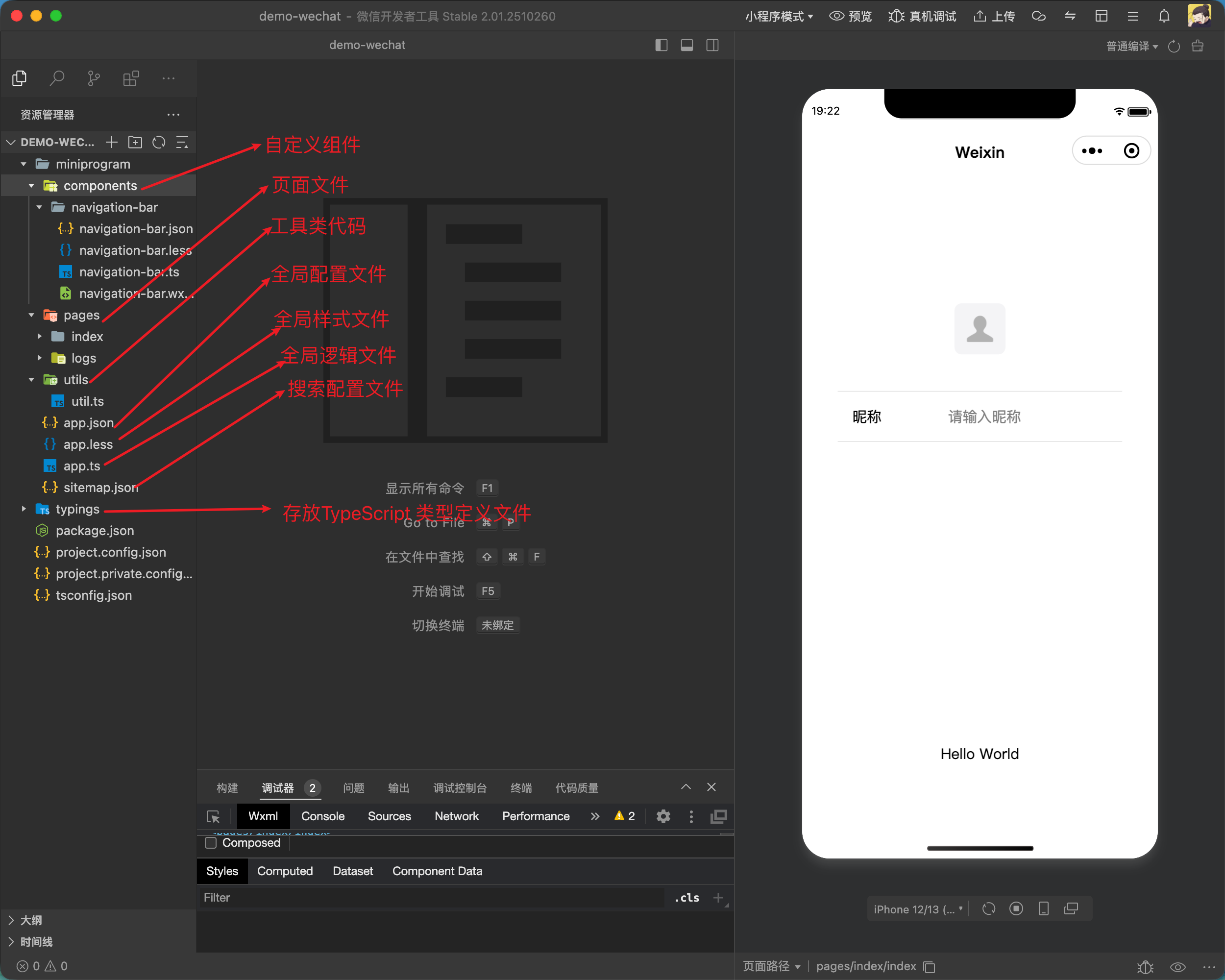
2. 基础配置
app.json: 声明pages、window(导航栏样式)、tabBarsitemap.json: 配置收录规则- 环境变量:构建时按环境生成
configs/env.js,运行态用import env from '../../configs/env'。敏感信息只保留非密钥的公开配置
3. 资源限制与规范
- 背景图必须使用网络图片,不能使用本地图片;确保 CDN 域名在下载白名单内
- 字体必须使用网络字体,不能打包本地字体;用
@font-face引入 CDN,需保证跨域与证书合规 - 图片体积与加载:首屏用压缩 WebP/PNG,大图懒加载(
image组件lazy-load),必要时用占位或骨架屏 - 静态资源缓存:CDN 设置合理缓存,版本更新带上 hash/query,防止旧缓存
4. 样式与组件规范
- 使用
rpx适配,约束最大宽度/高度,避免超长文案溢出(word-break: break-all) - 组件化常用模块:导航栏、列表空态、加载骨架、错误提示/重试
- 避免滥用全局样式,页面内样式作用域化,减少选择器层级;图标优先 iconfont/svg sprite
5. 网络与缓存策略
- 无网络缓存:关键接口不依赖本地缓存,必要时请求带时间戳;后端返回
Cache-Control: no-cache - 域名与 HTTPS:在微信后台配置 request/upload/download 域名,全部使用 HTTPS,证书有效且无混合内容
- 网络差兜底:合理超时与重试(指数退避);弱网降级动效/图片质量,提供「重试」按钮;用
wx.getNetworkType+onNetworkStatusChange提示用户 - 离线占位:允许可选的本地占位数据/空态,但上线数据必须来自实时接口
6. 请求封装与状态管理
6.1 封装 request
mermaid
flowchart TD
  A["baseRequest(options) 调用"] --> B["method/timeout/retries 解构\nupperMethod, timestamp"]
  B --> C{GET ?}
  C -->|是| D["排序 GET data\nbuildSortedParamString"]
  C -->|否| E["JSON.stringify data\n封装 param_json"]
  D --> F["encodeURIComponent -> paramJson"]
  E --> G["buildSortedParamString(param_json)\nencodeURIComponent -> paramJson"]
  F --> H["sign(method,timestamp,paramJson)\nHMAC-SHA256(appSecret)"]
  G --> H
  H --> I["组装 headers\ncontent-type/app/appSecret/method/timestamp/sign\n追加 Authorization(可选)"]
  I --> J["wx.request(baseUrl+url, data, headers,\n timeout)"]
  J --> K{statusCode 2xx ?}
  K -->|是| L["resolve(data)"]
  K -->|否 且 401/403| M["reject({ type: 'auth', res })"]
  K -->|否 其他| N["reject({ type: 'http', res })"]
  J --> O{fail?}
  O -->|且 attempt < retries| P["retry 延时 retryDelay\nattempt+1"]
  O -->|超出重试| Q["reject(err)"]
  P --> J
ts
import crypto from "crypto-js";

// 更健壮的请求封装:签名、超时、重试、鉴权错误分类
export const baseRequest = ({
  url = "",
  method = "GET",
  data = {},
  header = {},
  timeout = 15000,
  retries = 0,
  retryDelay = 500,
  baseUrl = "",
  appKey = "",
  appSecret = "",

} = {}) => {
  const upperMethod = method.toUpperCase();
  const timestamp = Math.floor(Date.now() / 1000);

  const buildSortedParamString = (params) => {
    if (!params || typeof params !== "object") return "";
    return Object.keys(params)
      .sort()
      .map((k) => `${k}=${params[k]}`)
      .join("&")
      .replace(/\s+/g, "");
  };

  const hmac = (input, secret) =>
    crypto.HmacSHA256(input, secret).toString(crypto.enc.Hex);

  const sign = (m, ts, paramJson) => {
    const paramPattern = `app_key${appKey}method${m}params${paramJson}timestamp${ts}`;
    const signPattern = appSecret + paramPattern + appSecret;
    return hmac(signPattern, appSecret);
  };

  const paramJson =
    upperMethod === "GET"
      ? encodeURIComponent(buildSortedParamString(data))
      : encodeURIComponent(
          buildSortedParamString({ param_json: JSON.stringify(data || {}) })
        );

  const signature = sign(upperMethod, timestamp, paramJson);

  const headers = {
    "content-type": "application/json",
    ...header,
    app: appKey,
    appSecret,
    method: upperMethod,
    timestamp: timestamp.toString(),
    sign: signature,
  };
  if (header?.Authorization) headers.Authorization = header.Authorization;

  const doRequest = (attempt = 0) =>
    new Promise((resolve, reject) => {
      wx.request({
        url: `${baseUrl}${url}`,
        method: upperMethod,
        data,
        header: headers,
        timeout,
        success: (res) => {
          const { statusCode } = res;
          if (statusCode >= 200 && statusCode < 300) {
            return resolve(res.data ?? res);
          }
          if (statusCode === 401 || statusCode === 403) {
            return reject({ type: "auth", res });
          }
          return reject({ type: "http", res });
        },
        fail: (err) => {
          if (attempt < retries) {
            return setTimeout(
              () => doRequest(attempt + 1).then(resolve).catch(reject),
              retryDelay
            );
          }
          reject(err);
        },
      });
    });

  return doRequest();
};
6.2 节流与并发
列表分页/搜索接口加防抖;长时间任务使用轮询或 backgroundFetch
6.3 页面数据流缓存
onLoad 拉首屏,onPullDownRefresh 触发刷新,分页处理 no more 状态;下拉/上拉结束后记得 stopPullDownRefresh
首页请求缓存的作用
- 首页请求缓存是为了提高首页的加载速度,避免用户在首页等待过长时间,从而提高用户体验。
- 首页请求缓存,防止断网及弱网情况下,用户无法看到内容。
首页请求缓存的实现
mermaid
flowchart TD
  A[进入首页 onLoad] --> B{本地有缓存且未过期?}
  B -- 否 --> C[显示骨架屏/空态占位]
  B -- 是 --> D[读取缓存并渲染占位数据]
  D --> E[并行发起接口请求]
  C --> E
  E --> F{请求成功?}
  F -- 否 --> G[提示弱网/重试按钮]
  F -- 是 --> H[更新页面数据]
  H --> I[写入缓存: 数据 + 时间戳]
  G --> J[下拉刷新/按钮重试]
  J --> E
示例:基于前面 request 封装的轻量缓存方法,支持 TTL、强制刷新、断网回退:
js
// utils/baseRequest.js
import { baseRequest } from "./baseRequest";

/**
 * 拉取并缓存接口数据
 * @param {Object} opts
 * @param {string} opts.key 缓存键(建议包含接口路径与查询参数)
 * @param {string} opts.url 接口路径
 * @param {Object} [opts.data] 请求参数
 * @param {number} [opts.ttl=5 * 60 * 1000] 缓存有效期(毫秒)
 * @param {boolean} [opts.force=false] 是否跳过缓存直接请求
 */
export async function requestWithCache({
  key,
  url,
  data,
  ttl = 5 * 60 * 1000,
  force = false,
}) {
  const now = Date.now();
  const cached = wx.getStorageSync(key);

  const isValid =
    cached &&
    cached.data !== undefined &&
    typeof cached.ts === "number" &&
    now - cached.ts < ttl;

  // 命中缓存且非强制刷新
  if (!force && isValid) {
    // 立即返回缓存,并在后台静默刷新(减少首屏等待)
    refreshInBackground();
    return { data: cached.data, from: "cache" };
  }

  // 直接请求
  return fetchAndStore();

  async function fetchAndStore() {
    try {
      const res = await baseRequest({ url, data });
      wx.setStorageSync(key, { data: res, ts: now });
      return { data: res, from: "network" };
    } catch (err) {
      // 断网或失败时尝试回退缓存
      if (cached) {
        return { data: cached.data, from: "stale-cache", error: err };
      }
      throw err;
    }
  }

  function refreshInBackground() {
    baseRequest({ url, data })
      .then((res) => wx.setStorageSync(key, { data: res, ts: Date.now() }))
      .catch(() => {});
  }
}
7. 安全策略
- 全程 HTTPS,上传/下载同域;接口签名/时间戳在后端完成
- token 仅短期存储(带过期时间),避免写死密钥;敏感操作二次确认
- 关闭调试开关与多余
console,在小程序后台开启安全与合规检查,审查第三方 SDK 仅保留必要权限
8. 性能与动效
- 性能:首屏接口合并/并行,减少 setData 频次与对象深度,列表使用分批渲染;必要时分包与独立分包
- 动效:优先 CSS 过渡/动画或
wx.createAnimation,避免高频 JS 驱动;低端机降级(缩短时长、减少阴影/模糊) - 图片与视频:开启
lazy-load,视频封面使用压缩图;避免在弱网自动播放视频
9. 其他服务
9.1 地图服务
- 使用腾讯地图 API,提供位置服务、路线规划、POI 搜索等功能
- 地图组件:
map组件,支持地图类型、缩放级别、标记点、路线显示等 - 地图事件:
bindmarkertap、bindcallouttap、bindregionchange、bindmarkertap等 - 地图交互:
wx.getLocation、wx.openLocation、wx.getRoute等 - 地图样式:
wx.getMapStyle、wx.setMapStyle等 - 地图权限:
wx.getLocation、wx.openLocation、wx.getRoute等
9.2 分享
- 使用微信分享 API,提供分享功能
- 分享组件:
share组件,支持分享类型、分享内容、分享链接等 - 分享事件:
bindshare、bindshareappmessage、bindsharetimeline等 - 分享交互:
wx.shareAppMessage、wx.shareTimeline等 - 分享样式:
wx.getShareInfo、wx.getShareTicket等
9.3 签到
- 使用微信 wx.getLocation 获取用户当前位置,提供签到功能
- 结合地图服务,提供签到位置的展示
9.4 SSE
mermaid
flowchart TD
  A[开始] --> B[创建请求任务]
  B --> C[设置流式传输]
  C --> D[处理接收到的数据]
D --> E[结束]js
const requestTask = wx.request({
  url: 'https://your-api-url',
  enableChunked: true,
  success(res){
    console.log('success:', res)
  },
  fail(err){
    console.warn('fail:', err);
  }
});

// 解析流式返回的数据
requestTask.onChunkReceived((chunk)=>console.log('chunk', chunk))